Google tag gateway: what it solves—and what it doesn't
Learn how Google tag gateway changes tag delivery, what Safari and blockers can still limit, and how to assess your site's data collection with confidence.
You did the thing everyone told you to do. You moved to server-side GTM. You pointed a subdomain at it, track.yourstore.com, nice and clean, same domain as the site. The consultant called it first-party.
And your GA4 still doesn't match your back office.
Not by a little. Your store says 800 orders last month. GA4 says 610. Meta claims 540 and change, with a fractional decimal that makes it look precise. Nobody can tell you which one is right, and the honest answer is none of them.
Here's the part that gets skipped: moving the server was never the fix. Where events are processed and how the browser is asked to reach that processor are two different problems. Server-side GTM solves the first one. Almost every deployment in the wild gets the second one wrong, and the second one is what ad blockers and Safari actually look at.
Google documented its own answer to this in July 2024 and put it into beta with Cloudflare that October. It was called First-Party Mode, it was renamed Google tag gateway for advertisers in May 2025, and it reached general availability on Google Cloud on June 1, 2026. It is a real improvement on what came before. It also doesn't solve the thing you think it solves.
Let's take it apart.
Why server-side GTM alone doesn't stop ad blockers
Does server-side tracking stop ad blockers? No. Not by itself. An ad blocker doesn't inspect your server architecture. It inspects the request the browser is about to make: the hostname, the path, the query parameters, and in some browsers, what that hostname actually resolves to.
Server-side tagging changes who processes the event after it arrives. It changes nothing about the request that has to leave the browser in the first place. If that request is recognizable, it dies in the browser, and your server never learns the event existed.
So the question was never "is my tagging server-side?" The question is: when the browser looks at this request, does it see your website, or does it see a tracker wearing your website's name?
For most sGTM setups, it sees the second one. Here's how.
What CNAME cloaking is, and why it stopped working
The standard sGTM deployment goes like this. You create track.yourstore.com. You point it, via a DNS CNAME record, at the vendor's infrastructure. Now the browser requests a URL on your own domain, and a third party quietly answers it.
That's CNAME cloaking, and it worked for a while because DNS resolution happens below the web layer. The URL bar, the request headers, the origin, all of it keeps saying yourstore.com the entire way down. The browser is being told one thing while something else picks up the phone.
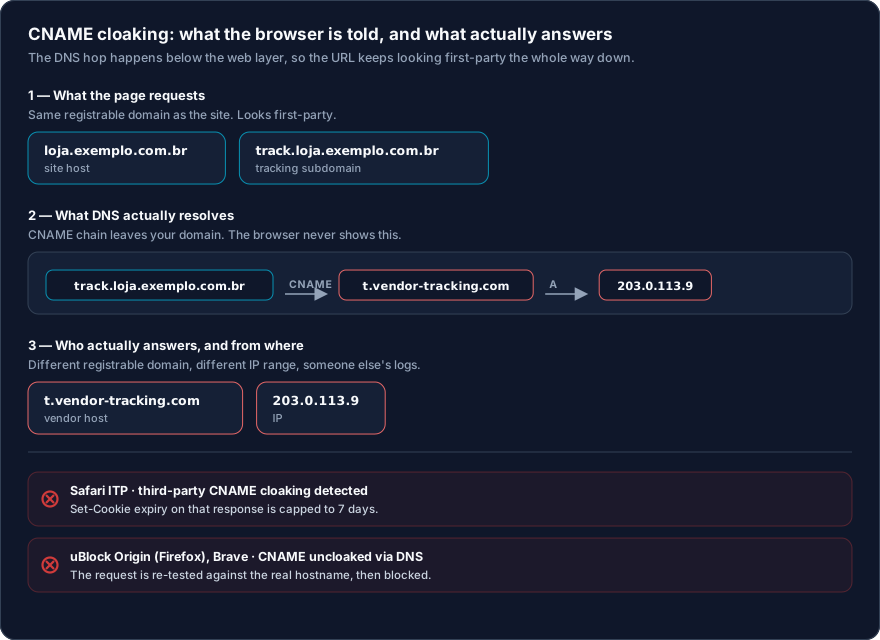
Does CNAME cloaking still work in 2026? Mostly no. It stopped being a reliable technique somewhere around 2020, and the counter-measures have only tightened since.
It's worth knowing that this was studied properly before browsers acted. Researchers at Sokendai in Japan, working with France's national cybersecurity agency ANSSI, crawled the Alexa top 300,000 sites in January 2020 and found 1,762 websites cloaking 56 distinct tracking providers, a practice they traced back to at least 2016. That paper is what WebKit cites in its own announcement. This wasn't a hunch. It was measured, published, and then engineered against.
How Safari and modern blocklists actually detect it
Two different mechanisms, and they catch it two different ways.
Safari: the CNAME and IP mismatch
WebKit's rule is published, and it's narrower than most people assume:
"Third-party CNAME cloaking is defined as a first-party subresource that resolves through a CNAME that differs from the first-party domain and differs from the top frame host's CNAME, if one exists."
When that fires, Safari caps the expiry of any cookie set in that HTTP response to 7 days. It doesn't block the request. It just quietly shortens the life of your identifier, which is worse, because nothing looks broken. This shipped in Safari 14, on iOS and iPadOS 14, and on macOS in Big Sur.
The nuance matters, so here is WebKit's own scenario table. Legitimate CDN setups are explicitly exempt. Only a hop to a registrable domain that differs from both your site and your site's own CDN triggers the cap.
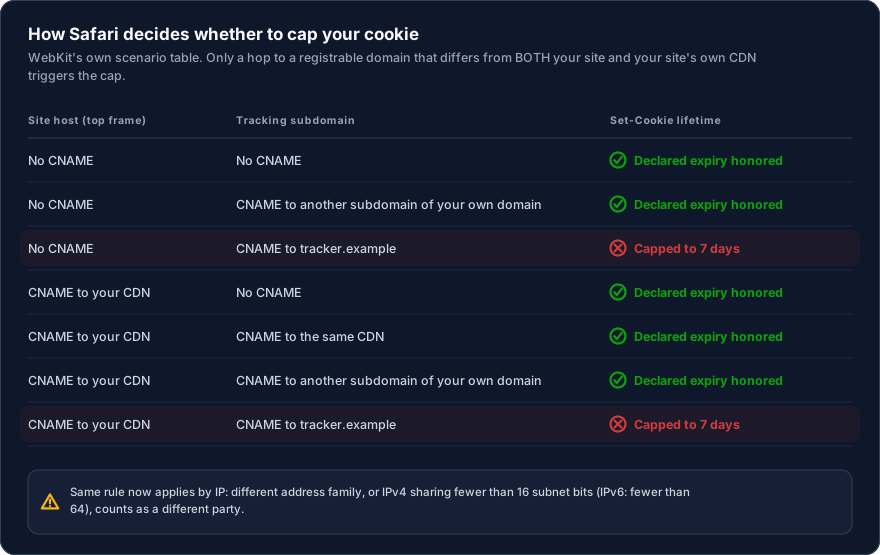
In Safari 17, WebKit extended the same logic to raw IP addresses, and it runs in normal browsing, not only in Private Browsing. This is the part that catches honest setups by accident. Your site host and your tracking host count as different parties if one is IPv4 and the other IPv6, if their IPv4 addresses share fewer than 16 subnet bits, or if their IPv6 addresses share fewer than 64. No CNAME required. Just a subdomain living somewhere far from the site.
Why this ends up mattering more than the 7 days sounds like it should:
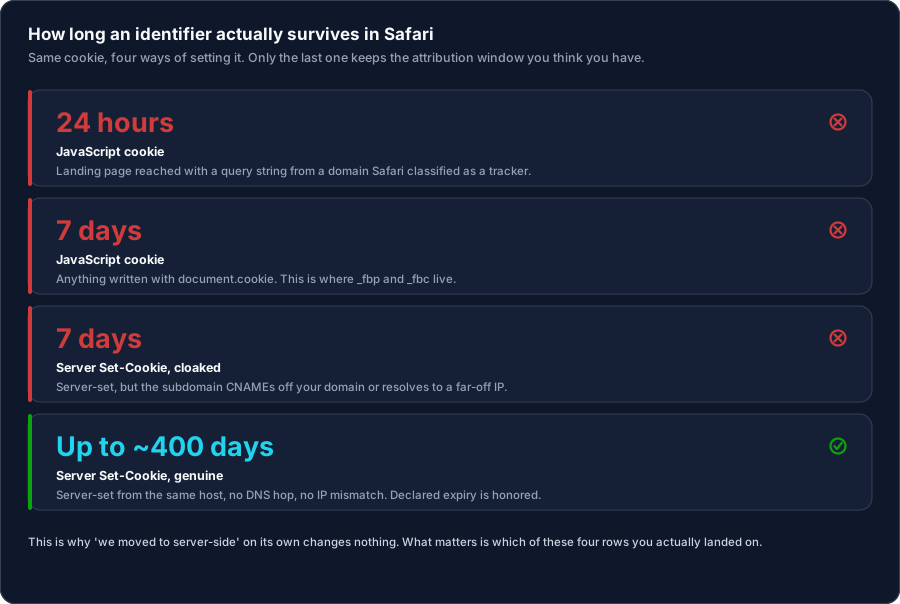
Your _fbp and _fbc cookies are written by JavaScript, so they were already living on a 7-day clock. The whole point of moving to a server-set cookie was to escape that. If the server setting it sits behind a CNAME or a distant IP, you didn't escape anything. You rebuilt the same 7-day window with more infrastructure underneath it.
Ad blockers: DNS uncloaking, and now IP matching
What is CNAME uncloaking? It's the blocker resolving the hostname itself before deciding.
uBlock Origin shipped this in version 1.24.1b0 in late 2019 using Firefox's browser.dns.resolve API. It looks up what your tracking subdomain actually points to, then re-runs the request through its filter engine using the real hostname. Your subdomain buys you nothing, because the blocker is no longer reading the name you gave it. Brave shipped the equivalent natively in its shields in late 2020. More recently, uBlock added matching on the resolved IP address, so the vendor can't dodge it by rotating hostnames.
Chrome extensions can't do this. Chrome provides no DNS API to extensions, and with Manifest V3 the full uBlock Origin no longer runs there at all; its Lite build has no DNS access either. So coverage is uneven, which is exactly why this feels survivable right up until it isn't. The same 2020 study measured uBlock Origin catching CNAME-cloaked tracking on around 70% of the sites where it was present, and Brave around 50% on blocklists alone, before its native uncloaking existed.
Is Google Tag Gateway any different?
Yes, at one layer. But it is also wrong to call Tag Gateway CNAME cloaking with a new logo.
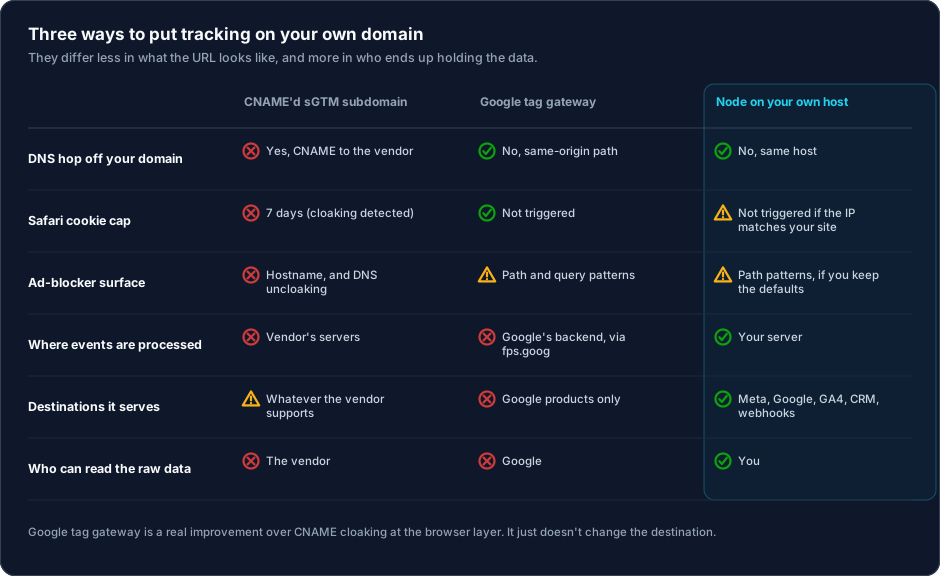
When deployed through a CDN or load balancer, it routes a path on the existing domain, such as /metrics, to serve and measure Google tags. The request can leave as https://www.yourstore.com/metrics/…: same host, same origin, and no third-party CNAME hop on that route. That removes the specific CNAME-cloaking surface. Google also supports serving scripts through the tagging server, either from a same-domain path or a custom subdomain. Judge the actual URL and its resolution in your setup, not the product name alone.
A same-host path is a real technical improvement over a subdomain that masks a third party. It is not, however, a guarantee of cookie lifetime or event delivery. ITP behavior still depends on browser heuristics and topology; verify the expiry Safari actually applied rather than inferring it from an architecture diagram.
Ad blockers do not decide on DNS alone. A same-origin path removes the CNAME-cloaking technique, but it does not make a request impossible to filter. Rules can match hostnames, paths, parameters, or known protocol patterns. Test the live implementation in the browsers and blockers that matter to your audience; do not treat the gateway as a way to bypass privacy choices.
The gateway changes Google-tag delivery; it does not become a complete data router. For a more durable setup, Google's documentation recommends combining it with server-side tagging. That second layer is where processing is centralised and destinations are defined. So the gateway alone does not answer where the collection endpoint is hosted, who can access the data, or how non-Google destinations receive an event.
Operations remain an infrastructure decision. CDN, load balancer, and tagging-server implementations have different ownership, cost, and constraints. Before migrating, establish who operates the route, which cookies may cross it, and how the behaviour will be monitored after the change.
Vendor-reported “observed signal” uplift is not conversion or revenue. Measure before and after against an independent source, such as approved orders or CRM opportunities, and distinguish improved script loading from improved attribution.
What ad-blocked traffic is actually worth
This is where almost everyone writing about this becomes unreliable, so let's be careful.
Around 29.5% of internet users worldwide use an ad blocker at least occasionally, roughly 1.77 billion people (GWI, Q2 2025, via DataReportal, measuring ages 16 to 64). Note "at least occasionally" — it isn't 29.5% of sessions. The usual move is to multiply the headline number by your revenue and call it your loss. That's wrong, and it's wrong in a way that matters.
Ad blockers don't stop purchases. The blocked user still lands, still browses, still checks out. Your revenue is intact. Your Shopify dashboard knows about every one of those orders. What you lost isn't the sale. It's the record of the sale reaching the ad platform.
So the real question is: what is a missing conversion record actually worth?
Not the order value. A conversion signal is worth whatever the platform's optimiser can do with it, and that value is wildly non-linear. Meta's public guidance commonly uses about 50 optimisation events within up to 7 days as a learning-phase reference. That is not a performance promise or a static rule: objectives, edits, and the product itself change. It does, however, show why weekly volume and signal coverage need to be considered together.
Signal loss does not imply a proportional loss in results. It can move an ad set further from the reference volume, but it does not prove the cause of a higher cost or weaker delivery by itself. Compare coverage, campaign structure, and revenue before attributing the problem to tracking.
Which produces a conclusion most vendors would rather you didn't reach:
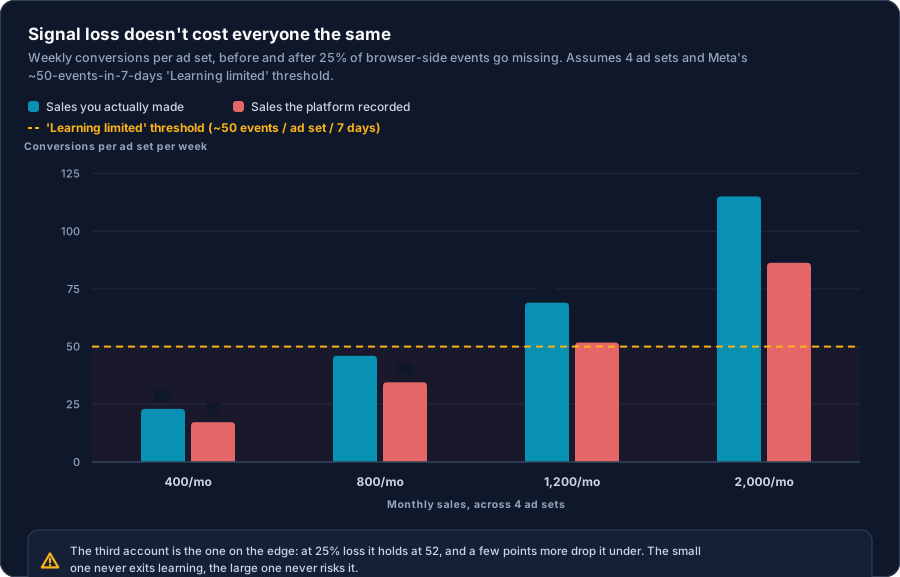
Run the arithmetic. Four ad sets, a 25% browser-side signal loss:
- 400 sales/month → 23 events per ad set per week, 17 after loss. It remains below the reference in both scenarios.
- 1,200 sales/month → 69 per ad set per week, falling to 52. At 30% loss it reaches 48; this is the kind of account where coverage can change proximity to the reference.
- 2,000 sales/month → 115 falling to 86. The loss does not take it below that reference, although better data may still improve bid quality.
With 25% loss in this example, the range where that loss can take one of four ad sets below the reference is roughly 870 to 1,160 conversions a month. At 40%, the top reaches about 1,450. That is scenario arithmetic, not an account diagnosis: volume, optimisation objective, audience, creative, and budget still matter. Measure current coverage before spending on infrastructure.
What actually holds up: same host, same IP
Strip away the marketing and the surviving configuration is boring:
The endpoint that receives events runs on the same host as the site, or on infrastructure that resolves into the same address range. No CNAME leaving your domain. No IP that Safari reads as a different party. The identity cookie is written by the server with Set-Cookie, not by JavaScript. Then Safari honors the declared expiry, and you get an attribution window measured in months rather than in days-since-last-visit.
WebKit publishes what it does and does not intend to disrupt, and "analytics in the scope of a single website" sits on the list of things it isn't trying to break. Same-host, first-party collection lives in that category.
Don't stretch that further than it goes, and I'd rather say this plainly than let you discover it later. WebKit defines cross-site tracking to include "the retention, use, or sharing of data from that activity with parties other than the first party on which it was collected." The moment you forward a conversion to Meta CAPI or Google Ads, you are sharing beyond the first party. Same-host server-set cookies survive today's heuristics because of how those heuristics are built, not because anyone handed out a blessing. That's a statement about mechanics. Treat it as one, and get proper consent for the forwarding, which is the part that actually needs it.
Now the honest caveat, because it applies to us too. If your site is on managed hosting and your tracking Node is on a VPS in another provider's range, Safari's IP heuristic can classify them as different parties and cap your cookie to 7 days. Same-domain isn't automatically same-party. It's the resolution topology that decides. Any vendor telling you that a subdomain on your domain is inherently safe hasn't read the IP extension, or is hoping you haven't.
When the hosts truly can't be aligned, the design has to assume a 7-day browser token on Safari and carry identity server-side instead of pretending the cookie will survive.
How to check your own setup
Ten minutes, no tools you don't already have.
1. Find the DNS hop.
dig +short track.yourstore.comIf a CNAME to someone else's registrable domain comes back, Safari is capping those cookies and Firefox with uBlock is resolving past your subdomain. If it's your own CDN and your site sits on the same CDN, you're in an exempt row of that table.
2. Compare the IPs.
dig +short A www.yourstore.com
dig +short A track.yourstore.com
dig +short AAAA www.yourstore.com
dig +short AAAA track.yourstore.com
Different address families, or IPv4s sharing fewer than 16 leading bits, means Safari may treat them as different parties even with no CNAME involved.
3. Check who actually sets your cookie. DevTools → Application → Cookies. Find your identity cookie. If it appeared without a Set-Cookie response header, JavaScript wrote it, and it's on a 7-day clock no matter what expiry you set.
4. Read the real expiry in Safari. Not Chrome. Chrome will happily show you the expiry you asked for. Open the site in Safari, complete a real interaction, then inspect the cookie's expiry. If you requested 365 days and see 7, you now know precisely which row of that table you're on.
5. Test with a blocker that uncloaks. Firefox with uBlock Origin, or Brave with shields up. Load a page, watch the network tab, see whether your tracking request survives. If it doesn't, that's what a meaningful share of your traffic looks like today.
Run these five and you'll know more about your own setup than most of the people who installed it.
None of this is fixable with more pixels. It's a question of where your tracking endpoint actually lives and who ends up holding the data, which is an infrastructure decision, not a tagging decision.
That's the whole reason Supreme Tracking exists: the Node runs on your server, on your host, under your domain, writing its own server-set cookie. Your events are processed by infrastructure you control, and forwarded from there to Meta, Google, GA4, your CRM, whatever you need. We validate your license. We never touch your conversion data.
But before any of that, run the five checks above. If your DNS comes back clean and your Safari cookies hold their declared expiry, you don't have this problem, and no one should sell you a solution to it.
Sources
- CNAME Cloaking and Bounce Tracking Defense — WebKit
- Tracking Prevention in WebKit
- Private Browsing 2.0 — WebKit (third-party IP cloaking)
- Characterizing CNAME Cloaking-Based Tracking on the Web — Dao, Mazel & Fukuda, TMA 2020
- CNAME Cloaking-Based Tracking on the Web: Characterization, Detection, and Protection — IEEE TNSM 2021
- uBlock Origin: CNAME uncloaking — project documentation
- uBlock Origin: IP-address filtering — project documentation
- Google tag gateway for advertisers — Google overview
- Serve Google scripts in a first-party context — Google documentation
- Ad Blocker Usage and Demographic Statistics — Backlinko (GWI / DataReportal)